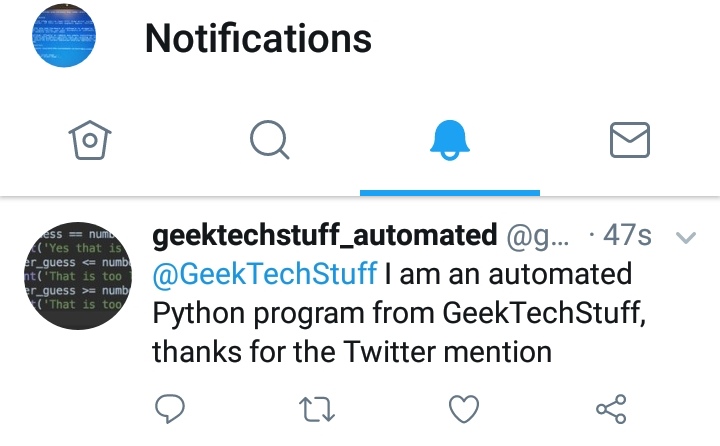
Okay, so my last post dealt with searching with Twython and this lead to me to thinking; what about replying to tweets that mention the search terms. Which is why I’ve created a auto-tweet reply program!

Some things I considered when writing this program;
- I wanted to reply to Tweets from a certain day range (in this case the last 24 hours) as I am thinking of running the script once a day (may need to change the formatted_date >= yesterday to get this working correctly.
- I didn’t want to spam Twitter (same reason I added in a delay between sending tweets).
# geektechstuff
# Twitter Application

from twython import Twython
#Twython is a Twitter Python library

import datetime
import time

#imports the Twitter API keys

from auth import (
    consumer_key,
    consumer_secret,
    access_token,
    access_token_secret
)

twitter = Twython(
    consumer_key,
    consumer_secret,
    access_token,
    access_token_secret
)

# This posts Tweets
# message = "geektechstuff.com Test Tweet aka /'Hello World!/'"
# twitter.update_status(status=message)
# print("Tweeted: %s" % message)

# This searches Tweets

print('GeekTechStuff Twitter Search Python Program')
print('')
search_term = input('What word should I look for? ')

results = twitter.cursor(twitter.search, q=search_term)

print('')
print('Searching Twitter...')
print('')

now = datetime.date.today()
now = str(now)
now = now.replace("-", "")
now = int(now)


for result in results:

    name = result['user']
    screen_name = name['screen_name']

    creation_date = result['created_at']

    tweet_txt = result['text']

    print('Twitter User:', screen_name)
    print('Posted:')
    print(tweet_txt)
    print('at:')
    print(creation_date)
    print('')

    # Next bit is all about the date of creation
    # Bit long winded and there is probably an easier solution
    date_unformatted = creation_date
    month = date_unformatted[4:7]
    date = date_unformatted[8:10]
    year = date_unformatted[-4:]
    if month == 'Jan':
        month = '01'
    elif month == 'Feb':
        month = '02'
    elif month == 'Mar':
        month = '03'
    elif month == 'Apr':
        month = '04'
    elif month == 'May':
        month = '05'
    elif month == 'Jun':
        month = '06'
    elif month == 'Jul':
        month = '07'
    elif month == 'Aug':
        month = '08'
    elif month == 'Sep':
        month = '09'
    elif month == 'Oct':
        month = '10'
    elif month == 'Nov':
        month = '11'
    elif month == 'Dec':
        month = '12'

    formatted_date = year + month + date
    formatted_date = int(formatted_date)
    yesterday = now - 1
    if formatted_date >= yesterday:
        #This posts Tweets
        twitter_handle = '@' + screen_name
        message = twitter_handle+" I am an automated Python program from GeekTechStuff, thanks for the Twitter mention "
        twitter.update_status(status=message, in_reply_to_status_id=twitter_handle)
        print("Tweeted: %s" % message)
        #delay so that it doesn't look like the program is spamming Twitter
        time.sleep(15)
One thing I am going to need to do is create a several messages and then get the program to randomly chose which to send as otherwise Twitter ends the program (Twitter doesn’t allow the same tweet to be sent twice consecutively).








4 responses to “Twitter Auto Reply To Tweets (Python)”
[…] my first run of the Twitter auto reply Python program I managed to cause a 403 Forbidden as the program duplicated a […]
LikeLike
[…] a little bit of a rework on this compared to V1 and V2 . I’ve scrapped the “date” format and instead utilised the Tweet ID and […]
LikeLike
Hi! I was searching online for resources to help me understand how to reply via Twython and I found your post.
I noticed that you’re providing the ‘in_reply_to_status_id’ parameter with input it doesn’t understand. I had trouble with this myself, so I thought I’d share what I learned.
The ‘in_reply_to_status_id’ parameter takes the unique ID number of the post you’re replying to; not the twitter handle, which is what it appears you’ve given it. In addition, ‘@handle’ still needs to be in the text of your tweet for Twython to succeed.
If the wrong input is given to this parameter, it is ignored.
With the correct input, your tweet will show up underneath the post you’re replying to, with a gray ‘Replying to @handle’ in the top left corner.
Cheers!
LikeLike
Thanks Chris, much appreciated 🙂
LikeLike