
Today I decided to try and analyse the text of Twitter tweets using Microsoft Azure and the cognitive services that it offers, particularly text sentiment. Text sentiment reviews the text and then gives it a score between 0.0 (negative) and 1 (positive), with 0.5 being neutral. This could help if for example you wanted to tackle negative tweets (i.e. you run a company and want to respond to negative tweets) or wanted to auto retweet positives (i.e. you ran a company and want tweets that say nice things about your products auto retweeted).
I’m building on / reusing some of my previous work, so if you want to follow my full thinking you may want to check out: My Twitter Bot and my first use of Azure. If you are skipping that reading then you will need the following to run this project:
- Twitter – A Twitter account and then also a consumer key, a consumer secret, an access token and an access token secret. I’ve saved all of these into a file called auth.py and then importing them into my project. You will need your own from Twitter and their Developer section: https://developer.twitter.com/
- Azure – an Azure account. I’m currently using a free trial (free trails are awesome).
Within Azure open “All services“, scroll down to “AI + Machine Learning” and open “Cognitive Services“.

Within Cognitive Services click Create and enter:
- Name: I went with Text_Analytics
- Subscription: I’m using the Free Trial, if you have an ongoing Azure subscription then choose wisely.
- Location: I went with UK South as it is the location nearest to me and UK West was not an option.
- Pricing tier: I went with F0. Again, this depends on your Azure subscription.
- Resource group: I created a new one called Text_Analytics.

Once the resource is created click “Overview” and it should confirm the location of the resource, the pricing tier and the endpoint that is in use. Also note the “Manage keys” link – clicking this will show two generated keys. The endpoint and a key will be needed for this program.

Also on the Overview screen is the quota information, make sure that this is monitored as you do not want to go over your allowance.
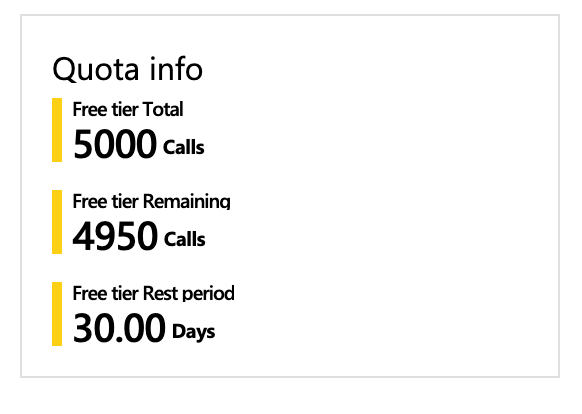
I’ve uploaded my Python program to my GitHub to make it easier for others to review / copy and made sure I’ve commented it. The link is https://github.com/geektechdude/Tweet_Text_Analysis

————-
————-
Currently my program returns the Tweet ID and the sentiment score. I’ll be looking to output the data in a different way soon, I’m thinking of using my automated Twitter bot to retweet positive tweets about Python.


 GeekTechStuff
4 responses to “Analysing Tweet Sentiment with Azure (Python)”
[…] on the work I did yesterday using Azure to analyse Twitter tweet sentiment I have amended the function of the code so that it now marks the tweet as positive, neutral or […]
LikeLike
[…] the Python program (see part 1 and part 2) collecting Tweets from Twitter and then analysing the data via Azure to see if the […]
LikeLike
[…] website doesn’t currently need a chat bot. However after completing my recent project around text sentiment using Azure cognitive services I thought I would take another look at a chat bot, especially as […]
LikeLike
[…] I discussed setting up Text Analytics on Microsoft Azure here: https://geektechstuff.com/2019/02/26/analysing-tweet-sentiment-with-azure-python/ […]
LikeLike