
Today I am having a quick play with the socket library in Python, and using it on my Rasperry Pi as a port scanner to check for vulnerabilities on devices connected to my home network. Yes, I know there are other tools available (such as nmap) that can do this but I wanted to see socket in action.
Before proceeding I need to make this very clear:
DO NOT USE THE BELOW INFORMATION TO ATTACK, MONITOR OR BREAK INTO ANY COMPUTER / NETWORK / DEVICE THAT DOES NOT BELONG TO YOU. I TAKE NO RESPONSIBILITY FOR YOUR ACTIONS.
Devices generally use TCP or UDP when talking to other devices over a network and when using TCP or UDP they have predefined ports for certain regular tasks, and custom ports for non-regular (or custom tasks).
For the port_test function I am going to scan for the following ports:
20 – FTP
21 – FTP Control
22 – SSH / SFTP / SCP
23 – Telnet
25 – SMTP
53 – DNS
79 – Finger
88 – Kerberos
389 – LDAP
515 – Print sharing
I don’t expect my Macbook to be advertising / publicising the majority of the above.
import socket
def port_test(IP_USER_INPUT):
s = socket.socket()
ip_address = IP_USER_INPUT
ports =[20,21,22,23,25,53,79,88,389,515]
for PORT in ports:
print(“Testing IP: “,ip_address, PORT)
try:
s.connect((ip_address,PORT))
response = s.recv(1024)
print(“”)
print(“Info for port “,PORT)
print(response)
print(“”)
s.close
except:
print(“error connecting to port “, PORT)
port_test(“IP_ADDRESS“)

Running the port_test function against my MacBook (currently on local address 192.168.0.11) with SSH enabled gives the following result:
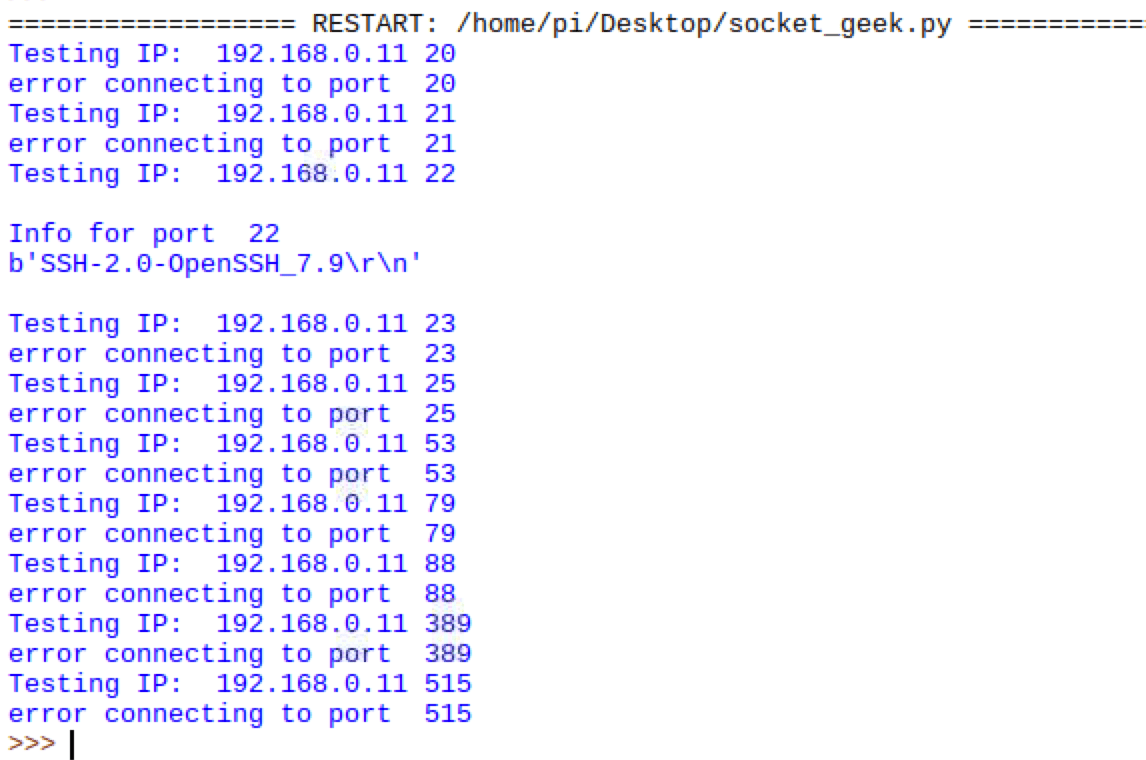
So with the SSH enabled the port_scan function connects and gets a response, and (as expected) the other ports fail to connect.
For more information of ports and what services generally run on them:
https://en.wikipedia.org/wiki/List_of_TCP_and_UDP_port_numbers


 GeekTechStuff
3 responses to “Creating A Port Scanner (Python / Raspberry Pi)”
[…] once wrote a port scanner in Python, but as ansible can already connect to the devices it can show all the open ports and their […]
LikeLike
[…] have expanded my previous port scanner to have a little bit more functionality e.g. identify webpages, save to a log file and to either […]
LikeLike
[…] open and even try to identify what operating system the hosts have running. I previously created a basic port scanner in Python, but in this blog post I am going to look at using Python with nmap to see some of what it can […]
LikeLike