
I’ve written blog posts on how to install Grafana and data exporters using Ansible (https://geektechstuff.com/2020/06/25/grafana-prometheus-and-node-exporter-on-raspberry-pi-via-ansible-raspberry-pi-and-linux/) and a blog post on adding users to Grafana using an API call (https://geektechstuff.com/2021/01/06/using-an-api-call-to-make-multiple-grafana-users-python/), but after re-reading my blog posts I decided to automate the process (previously a manual step in the Ansible post) of adding data sources.
I have used the code from my original Grafana API post, altering the URL section so that it has its own function (create_url()) and adding in a function to call to the data sources API.
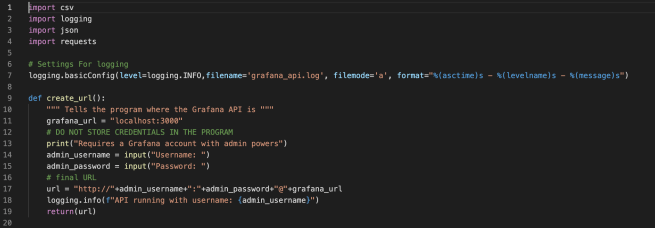

The create_datasource() function reads the data sources from a CSV (in this case datasourcs.csv) and then creates them within Grafana.

I’ve also added the Python logging module into my API program now so I can export details into a log (grafana_api.log), with settings at the beginning of the program to control what level of logging takes place, which allows me to add in debug lines of logging if I need to.

import csv
import logging
import json
import requests

# Settings For logging
logging.basicConfig(level=logging.INFO,filename='grafana_api.log', filemode='a', format="%(asctime)s - %(levelname)s - %(message)s")

def create_url():
    """ Tells the program where the Grafana API is """
    grafana_url = "localhost:3000"
    # DO NOT STORE CREDENTIALS IN THE PROGRAM
    print("Requires a Grafana account with admin powers")
    admin_username = input("Username: ")
    admin_password = input("Password: ")
    # final URL
    url = "http://"+admin_username+":"+admin_password+"@"+grafana_url
    logging.info(f"API running with username: {admin_username}")
    return(url)

def create_datasource():
    """ Reads data source details from a CSV located in same directory as program, then creates the data source. """
    api_path = "/api/datasources"
    url = create_url()
    url = url+api_path
    logging.info(f"Connecting to API {api_path}")
    # loops for the lines in the CSV and makes a request for each
    with open ('datasources.csv', newline='') as csvfile:
        reader = csv.DictReader(csvfile)
        for row in reader:
            name = row['name']
            type1 = row['type']
            url1 = row['url']
            access = row['access']
            parameters = {"name":name,"type":type1,"url":url1,"access":access}
            headers = {"content-type": "application/json"}
            # data is a Python dictionary and needs explicitely converting to JSON
            response = requests.post(url,headers=headers,data=json.dumps(parameters))
            logging.info(f"Data Source Creation. {name} of type {type1} at URL {url1} has response: {response}")
    return()
A future improvement could be to add the credentials in as variables (perhaps from a file or passed in as environment variables).



 GeekTechStuff
One response to “Grafana – Using An API Call To Add DataSources (Python)”
[…] My Grafana API Python code which I started to detail here and then add more to here. […]
LikeLike