
My recent blog posts have shown how to deploy resources in Kubernetes, and how Helm is used as a chart (“package”) manager for Kubernetes. Glueing the posts together and it is possible to have CI/CD pipelines deploying resources or charts into Kubernetes clusters. But what if there was another way?
CI / CD – The Push Method
CI / CD is a push method, I make a change to my code, push it a repository (Source Control) and then a pipeline runs and pushes the changes to the Kubernetes cluster. It works and all is good. But there are some drawbacks:
- Possibility of configuration drift; someone updates the cluster outside of the CI / CD pipeline which then leads to a question around which is configuration state is correct
- Auditing; requires that CI / CD record the changes it makes
- Rollbacks can be complicated
- Requires a CI / CD pipelines configured to push changes
GitOps – The Pull Method
The GitOps method uses a pull method rather than the push method, with agents inside the Kubernetes cluster doing the pulling and applying changes into the cluster.
GitOps has four principles of Declarative, Continuously Delivered, Automatically Reconciled, and Versioned-Controlled State.
Declarative
The system and its desired state is declaratively expressed.
Versioned-Controlled State
The desired state is stored in version control, with history and immutability.
Continuously Delivered
The desired state is automatically and continuously pulled from version control.
Automatically Reconciled
The state of the system is continuously observed and the desired state is applied if any changes occur to the system state outside of the version control.
Argo CD
An example of GitOps is Argo CD which says it is a declarative, GitOps continuous delivery tool for Kubernetes. Argo CD monitors Git repositories and uses them as the source of truth for a deployment, it then uses the repository (e.g. the Helm charts in the repo) to deploy the app and required resources into Kubernetes.
Installing Argo CD
I’m going to use Helm to install Argo CD. First I’m putting it into its own namespace called argocd:
kubectl create namespace argocd
Then I’m adding the Argo CD repository to Helm:
helm repo add argo https://argoproj.github.io/argo-helm
Time to deploy. The below installs Argo CD as “argo-cd” into my “argocd” namespace.
helm install argo-cd argo/argo-cd -n argocd
Once deployed the Argo CD login password will be needed (default username is “admin”):
kubectl -n argocd get secret argocd-initial-admin-secret -o jsonpath="{.data.password}" | base64 -d
And connection to the Argo CD web frontend can be achieved (for testing) with a port forward:
kubectl port-forward service/argo-cd-argocd-server -n argocd 8080:443
Note: Make sure to change the default password and delete the initial secret after initial login.
Argo CD is now deployed into the Kubernetes cluster, is running and accessible. Now it needs some settings to say what it should be creating.
Creating An Argo CD Deployment
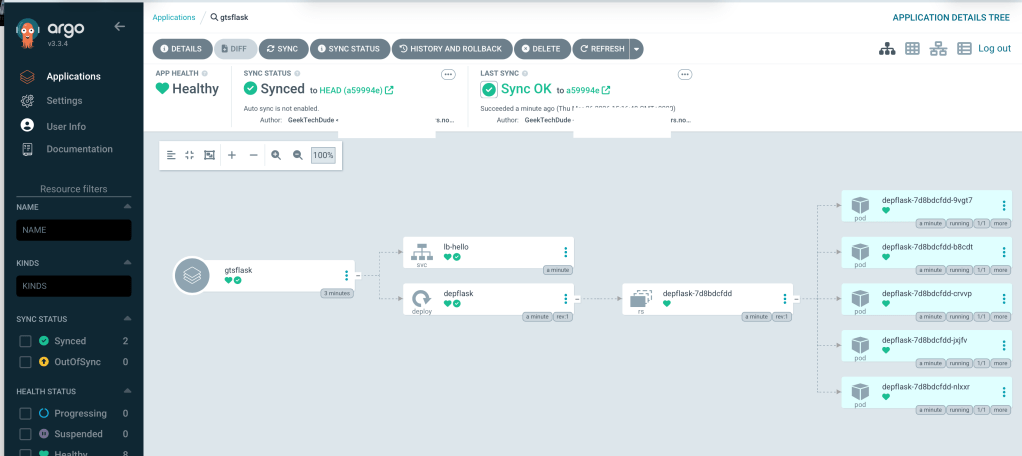
Log into Argo CD, and click “New App”. Argo CD will then launch the new app screen asking for an application name, project name, sync policy (manual or automatic) and at least a repository URL. Once populated with a repository Argo CD will ask for a destination directory within the repository and will pull in values from the values.yaml that can be overwritten.
For this example I have removed my previous Helm install of my basic helm chart, and will redeploy it using Argo CD. The chart is available at: https://github.com/geektechdude/helm-basic-chart

 GeekTechStuff
Leave a comment