
Typically when using the search function in an operating system it returns just files where the titles contain the search terms. However as Raspbian is a Linux OS it contains a powerful search option within the Terminal called Grep.
Grep was created in 1974 by Ken Thompson and allows for expressions (e.g. character strings) to be searched for within plain text files. Wikipedia has a page about Grep at https://en.wikipedia.org/wiki/Grep . Plain text files may make you think, “thats just .txt files” but it is not. A lot of file types are just plain text files with different file extensions and some examples Grep can search through include:
- .txt (text files)
- .py (Python files)
- .html (HyperText Markup Language files)
- .sh (Linux shell files)
- .json (JavaScript Object Notation files)
- .xml (Extensible Markup Language files)
Using Grep
Grep can be used with several different options depending how on we want to search, I’ve used a few examples below.
Searching in all file types in the current directory:
grep geektechstuff *.* -i
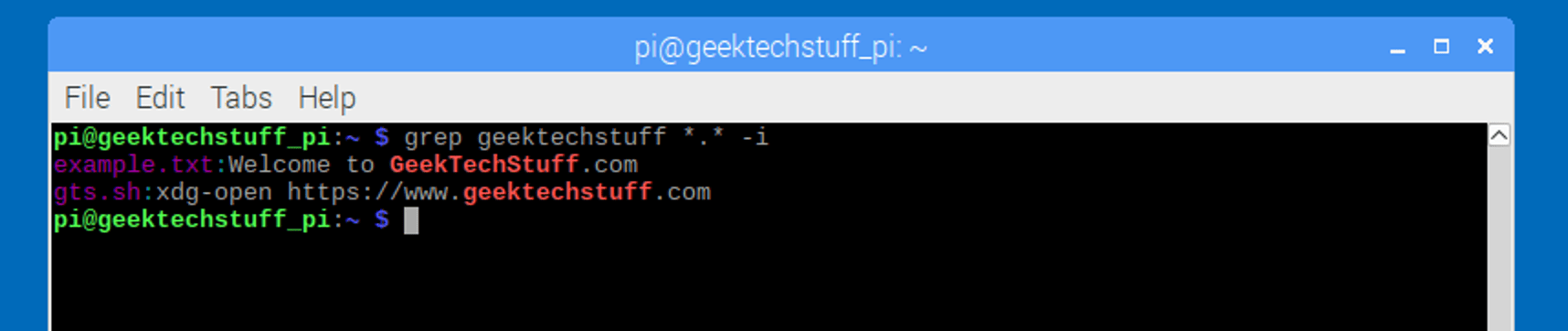
This would search the Terminals current working directory for any file (*.*) for the string “geektechstuff”. The -i option tells Grep to ignore the case of the string, without this it would look for geektechstuff but not Geektechstuff or gEEKTECHSTUFF.
Searching in one file type in the current directory:
grep geektechstuff *.txt -i

This would search the Terminals current working directory for any txt file (*.txt) for the string “geektechstuff”. The -i option tells Grep to ignore the case of the string, without this it would look for geektechstuff but not Geektechstuff or gEEKTECHSTUFF.
Searching in all file types recursively
grep -r geektechstuff -i

The -r tells Grep to search recursively through the current working directory and all sub directories.
Searching in particular file types recursively
grep -r -i –include=\*.py geektechstuff ./

The –include=\*.py tells Grep to look for in all .py (Python) files for geektechstuff and ./says to start in the current working directory, with the -r making Grep work through the sub-directories recursively.



 GeekTechStuff
3 responses to “Searching Through Files With Grep (Raspberry Pi)”
[…] wrote an entry on grep a little while ago, and also one on cron . The file path /var/log/syslog is the path of the log […]
LikeLike
[…] Expressions. I originally tried to grasp them whilst playing around with grep last November and they are extremely powerful, if not a little complicated. As I’m […]
LikeLike
[…] you want to search through history for a certain string or command that has been entered then grep can […]
LikeLike