
I am continuing on my Java adventure and taking a brief look at variables within Java before tackling my first Java assignment (creating a planning assistant).
Declaring Variables
Variables in Java must be defined by their type:
int for integer (whole numbers) e.g. -5, 5, 100000, 0
double for decimal numbers (float numbers) e.g. 3.14, -3.78, 0.99, 1222453.7
Boolean for true or false conditions.
string for strings of characters e.g. this is a string and it can contain characters like ? and =
char for a single character e.g. a
Strings are contained within speech marks “like this” where as a char is contained in a speech mark like this character ‘a’.
Note: That “a” is a string (containing a single character) and ‘a’ is a character. Strings can contain single or multiple characters but characters (in the char sense) are singular.
Before a variable is used in Java it must be declared using its type and then naming it. For example:
String aString;
int aNumber;
char aCharacter;
Once a variable has been declared it can be used. For example:
aString = “This text is in the variable”;
aNumber = 45;
aCharacter = ‘r’;
Mismatch Exception / Error

A mismatch exception / error occurs when a declared variable contains an unexpected type e.g. putting a character into an integer variable.
Casting
A variable can be recast into a different declaration/type by using casting. For example:
double pi = 3.14;
int rounded_pi = (int) pi;
Printing pi would give 3.14 but printing rounded_pi would give 3 as the above tells Java to cast the double into an integer (whole) number.
User Input
Java can use a utility called java.util.Scanner to receive user input. To import this utility an import line should be added before the public class is defined.
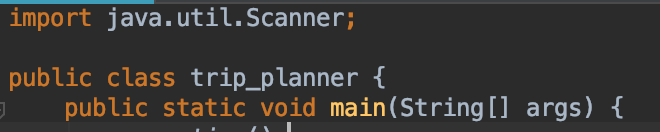
Once imported a Scanner needs to be defined for use.

The scanner is used in conjunction with a declared variable to received input, so be careful of what the variable is declared as (e.g. a int variable will throw an mismatch error if it receives a char).
In the above example I have defined a string variable called name and a string variable called location. I have then said that the input will be a string typed in and ended with the return/enter key.
Instead of .nextLine() I could have used:
- .nextInt() if an integer was being inputted
- .nextDouble() if a double number was being inputted
- .next() if a string with no spaces was being inputted
Planning Assistant
My first Java assignment is to create a planning assistant that asks the user questions and uses the user input to perform tasks.

The full Java for this can be viewed at: https://github.com/geektechdude/Java_stuff/blob/master/trip_planner.java



 GeekTechStuff
One response to “Variables / Travel Planner (Java)”
[…] a void to a return the word void should be replaced with int, double, or char – readers of my variables post will notice that these are types of variables Java […]
LikeLike